
Septum — Features & Detection Reference
Detection Pipeline
Septum runs a three-layer detection pipeline, entirely locally. Each layer is additive — layers are merged through a coreference resolver so the same person shows up as a single [PERSON_1] placeholder regardless of how they were named.

| Layer | Technology | Entity types |
|---|---|---|
| 1 | Presidio — regex patterns with algorithmic validators (Luhn, IBAN MOD-97, TCKN, CPF, SSN). Context-aware recognisers with multilingual keywords. | EMAIL_ADDRESS, PHONE_NUMBER, IP_ADDRESS, CREDIT_CARD_NUMBER, IBAN, NATIONAL_ID, MEDICAL_RECORD_NUMBER, HEALTH_INSURANCE_ID, POSTAL_ADDRESS, DATE_OF_BIRTH, MAC_ADDRESS, URL, COORDINATES, COOKIE_ID, DEVICE_ID, SOCIAL_SECURITY_NUMBER, CPF, PASSPORT_NUMBER, DRIVERS_LICENSE, TAX_ID, LICENSE_PLATE |
| 2 | NER — HuggingFace XLM-RoBERTa with per-language model selection (20+ languages). ALL CAPS input auto-normalised to title case. LOCATION + ORGANIZATION_NAME pass through a multi-word-or-high-score gate to drop common-noun mis-fires. | PERSON_NAME, LOCATION, ORGANIZATION_NAME |
| 3 | Ollama — local LLM for context validation, alias detection, and semantic entities. | PERSON_NAME aliases/nicknames; DIAGNOSIS, MEDICATION, RELIGION, POLITICAL_OPINION, SEXUAL_ORIENTATION, ETHNICITY, CLINICAL_NOTE, BIOMETRIC_ID, DNA_PROFILE |
Coreference resolution. After all three layers have produced spans, the sanitiser collapses co-referring mentions: "John", "J. Doe", and "Mr. Doe" in the same document all map to [PERSON_1]. This works across sentences and across chunks of the same document.
Layer 3 is optional. Set use_ollama_semantic_layer=false in settings to skip it. Layers 1 and 2 handle structured identifiers and names; Layer 3 adds semantic sensitive-category detection that regex and NER cannot cover. Detection accuracy depends on the Ollama model — Septum defaults to aya-expanse:8b.
Regulation Packs
17 built-in regulation packs ship with Septum. Multiple can be active simultaneously — the sanitiser applies the union of rules and the most restrictive rule wins.
| Region | Code | Regulation |
|---|---|---|
| 🇪🇺 EU / EEA | gdpr | General Data Protection Regulation |
| 🇺🇸 USA (Healthcare) | hipaa | Health Insurance Portability and Accountability Act |
| 🇹🇷 Turkey | kvkk | Personal Data Protection Law (6698) |
| 🇧🇷 Brazil | lgpd | Lei Geral de Proteção de Dados |
| 🇺🇸 USA (California) | ccpa | California Consumer Privacy Act |
| 🇺🇸 USA (California) | cpra | California Privacy Rights Act |
| 🇬🇧 United Kingdom | uk_gdpr | UK GDPR |
| 🇨🇦 Canada | pipeda | Personal Information Protection and Electronic Documents Act |
| 🇹🇭 Thailand | pdpa_th | Personal Data Protection Act |
| 🇸🇬 Singapore | pdpa_sg | Personal Data Protection Act |
| 🇯🇵 Japan | appi | Act on the Protection of Personal Information |
| 🇨🇳 China | pipl | Personal Information Protection Law |
| 🇿🇦 South Africa | popia | Protection of Personal Information Act |
| 🇮🇳 India | dpdp | Digital Personal Data Protection Act |
| 🇸🇦 Saudi Arabia | pdpl_sa | Personal Data Protection Law |
| 🇳🇿 New Zealand | nzpa | Privacy Act 2020 |
| 🇦🇺 Australia | australia_pa | Privacy Act 1988 |
Each row is a loadable pack under packages/core/septum_core/recognizers/. Legal sources for every entity type live in the regulation entity sources doc.
Region-specific national ID validators are algorithmic, not pattern-only: TCKN (Turkey, mod-10 + mod-11 checksum), Aadhaar (India, Verhoeff), CPF (Brazil, two-digit checksum), NRIC/FIN (Singapore, letter checksum), Resident ID (China, ISO 7064 MOD 11-2), NINO (UK), CNPJ (Brazil), My Number (Japan), and more. Invalid checksums are rejected, so random 11-digit strings do not trigger false positives.
Custom rules. The dashboard lets admins define custom rulesets with regex patterns, keyword lists, or LLM-prompt based detection. Custom rules sit alongside built-in packs — policy composition rules still apply. See custom-rules.md for worked examples per detection method, the test loop, and audit-trail behavior.
Auto-RAG Routing
When no documents are selected in the chat sidebar, Septum decides automatically whether to search documents or answer as a plain chatbot.
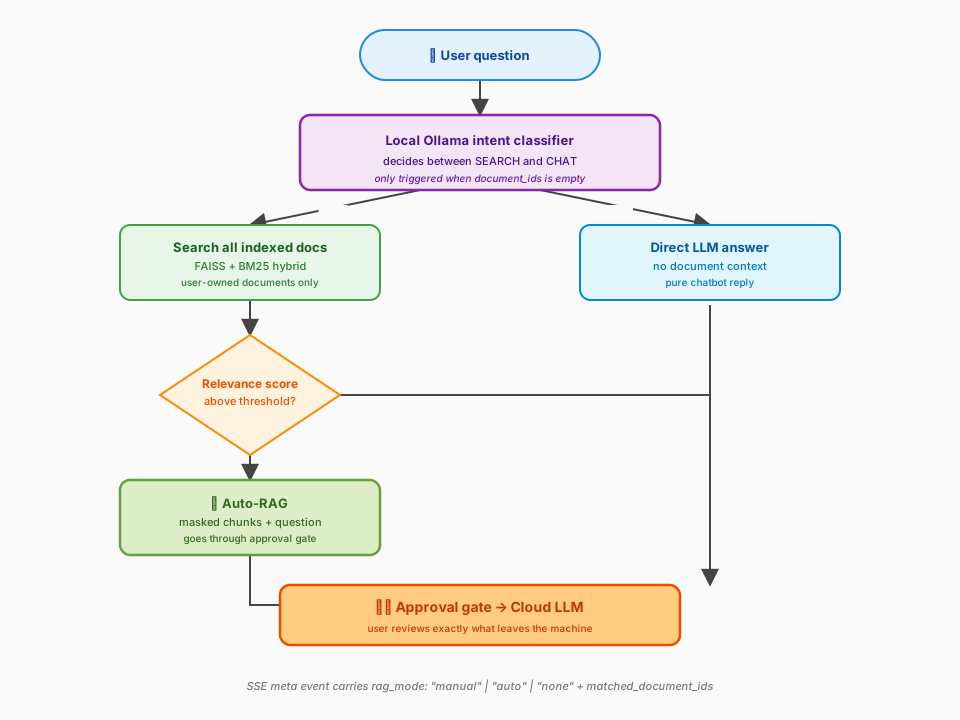
Three paths result:
- Manual RAG — user explicitly selects documents. Classifier skipped; the selection drives retrieval as before.
- Auto-RAG — no selection, classifier says SEARCH, relevance score above threshold. Chunks retrieved across all user documents.
- Pure LLM — no selection, classifier says CHAT or relevance below threshold. No document context attached; the LLM answers freely.
The SSE meta event gained a rag_mode: "manual" | "auto" | "none" field plus matched_document_ids so the dashboard can show a badge on each assistant message. Threshold lives in the RAG settings tab as rag_relevance_threshold (default 0.35).
Why Septum
| Capability | Septum | Plain ChatGPT / Claude | Azure Presidio | LangChain pipeline |
|---|---|---|---|---|
| PII masked before cloud | Yes | No | Detection only | Build yourself |
| Multi-regulation (17 packs) | Yes | No | No | Build yourself |
| Approval gate before LLM | Yes | No | No | Build yourself |
| De-anonymisation (real values) | Yes | N/A | No | Build yourself |
| Document RAG with hybrid retrieval | Yes | No | No | Partial |
| Auto-RAG intent routing | Yes | No | No | Build yourself |
| Custom detection rules | Yes | No | Limited | Build yourself |
| Ready-to-use web UI | Yes | N/A | No | No |
| Audit trail & compliance | Yes | No | No | Build yourself |
| Works with any LLM provider | Yes | Single | Azure only | Configurable |
| Fully self-hosted | Yes | No | Cloud service | Depends |
Other tools offer pieces of the puzzle — detection here, a vector store there. Septum is the complete end-to-end pipeline: detection → anonymisation → mapping → retrieval → approval → LLM call → de-anonymisation → audit. Out of the box, with a UI, for any regulation.
MCP Integration
Septum ships a standalone Model Context Protocol server, septum-mcp, that plugs the same local PII masking pipeline into any MCP-aware client. MCP is an open, vendor-neutral specification — the server supports all three standard transports:
- stdio (default) — for subprocess-launching clients: Claude Desktop, Cursor, Windsurf, ChatGPT Desktop, Zed, and anything built against the Python / TypeScript / Rust / Go / C# / Java SDKs.
- streamable-http — modern HTTP transport for remote, browser, or containerised clients. Bearer-token auth via
Authorization: Bearer <SEPTUM_MCP_HTTP_TOKEN>. - sse — legacy HTTP + Server-Sent Events transport, kept for clients that haven't migrated to streamable-http yet.
septum-core runs in-process; raw PII never reaches the network.
Tools exposed:
| Tool | Purpose |
|---|---|
mask_text | Mask PII in a snippet and return a session id. |
unmask_response | Restore originals inside an LLM reply using the session id. |
detect_pii | Read-only scan — returns entities without retaining a session. |
scan_file | Read a local file (.txt, .md, .csv, .json, .pdf, .docx) and scan it. |
list_regulations | List the 17 built-in regulation packs with their declared entity types. |
get_session_map | Return {original → placeholder} for local debugging only. |
Stdio client (Claude Desktop, Cursor, Windsurf, Zed, ChatGPT Desktop):
{
  "mcpServers": {
    "septum": {
      "command": "septum-mcp",
      "env": {
        "SEPTUM_REGULATIONS": "gdpr,kvkk",
        "SEPTUM_LANGUAGE": "en"
      }
    }
  }
}
HTTP client (remote agent, browser extension, shared team server):
{
  "mcpServers": {
    "septum": {
      "url": "https://mcp.example.com/mcp",
      "headers": {
        "Authorization": "Bearer <your-token>"
      }
    }
  }
}
Run the HTTP server yourself:
SEPTUM_MCP_HTTP_TOKEN=$(openssl rand -hex 32) \
  septum-mcp --transport streamable-http --host 0.0.0.0 --port 8765
See the MCP server guide for the complete HTTP deployment guide (Docker, compose profiles, TLS reverse-proxy pattern), environment variable reference, and end-to-end tool examples.
REST API & Authentication
The Septum backend ships a FastAPI REST layer documented at /docs (Swagger) and /redoc. Two authentication methods are supported.
JWT (browser sessions, short-lived)
The setup wizard creates the first admin account; subsequent logins return a JWT good for 24 hours.
curl -X POST http://localhost:3000/api/auth/login \
  -H 'Content-Type: application/json' \
  -d '{"email": "admin@example.com", "password": "your-password"}'
# → {"access_token": "...", "token_type": "bearer"}
API keys (CI/CD, MCP integrations, long-lived)
Admins issue programmatic API keys via POST /api/api-keys. The raw key is shown once at creation; only its 8-character prefix and a SHA-256 hash are persisted.
# Create a key (response includes raw_key — store it now, you cannot retrieve it later)
curl -X POST http://localhost:3000/api/api-keys \
  -H 'Authorization: Bearer <jwt>' \
  -H 'Content-Type: application/json' \
  -d '{"name": "ci-pipeline", "expires_at": null}'

# Use it on any subsequent request
curl -H 'X-API-Key: sk-septum-<64 hex chars>' http://localhost:3000/api/auth/me

# List keys (prefixes + metadata only — raw keys are never returned again)
curl -H 'X-API-Key: sk-septum-…' http://localhost:3000/api/api-keys

# Revoke
curl -X DELETE -H 'X-API-Key: sk-septum-…' http://localhost:3000/api/api-keys/{id}
Rate limits
| Endpoint | Limit |
|---|---|
POST /api/auth/register | 3 / minute |
POST /api/auth/login | 5 / minute |
POST /api/api-keys | 10 / minute |
| Everything else | 60 / minute (configurable via RATE_LIMIT_DEFAULT) |
API-key requests are rate-limited by key prefix, not IP, so services behind a shared NAT each get their own quota. Anonymous and JWT requests fall back to the remote IP. Limits are stored in Redis when configured; otherwise in-process memory (single-node dev only).
Quick API example
# Upload a document
curl -X POST http://localhost:3000/api/documents/upload \
  -H "Authorization: Bearer $TOKEN" \
  -F "file=@contract.pdf"

# Ask a question (streamed response via SSE)
curl -N -X POST http://localhost:3000/api/chat/ask \
  -H "Authorization: Bearer $TOKEN" \
  -H "Content-Type: application/json" \
  -d '{"message": "What are the termination clauses?", "document_id": 1}'
The chat endpoint returns Server-Sent Events: meta → approval_required → answer_chunk → end.
For the complete API reference, pipeline details, and deployment topologies, see the Architecture doc.