Your data never leaves. Your AI still works.



What is Septum?
Septum is a privacy-first AI middleware that sits between you and cloud LLMs. You can ask questions with sensitive company data — and chat freely — with ChatGPT, Claude, Gemini, or any other LLM; Septum detects and masks personal information locally before it reaches the cloud.
In one sentence: Septum is a safety layer for teams who want LLM power without leaking personal data — whether it is in a document or in something you typed.
Before and after — what the LLM actually sees:
Document chunk: "Ahmet Yılmaz was born in Istanbul in 1985. His mother is Ayşe and his father is Ali."
Masked:         "[PERSON_1] was born in [LOCATION_1] in 1985. His mother is [PERSON_2] and his father is [PERSON_3]."

User question:  "Where was Ahmet Yılmaz (mother Ayşe, father Ali) born?"
Masked:         "Where was [PERSON_3] (mother [PERSON_1], father [PERSON_2]) born?"
The LLM answers using placeholders. Septum restores real values locally before showing you the response.
How It Works?
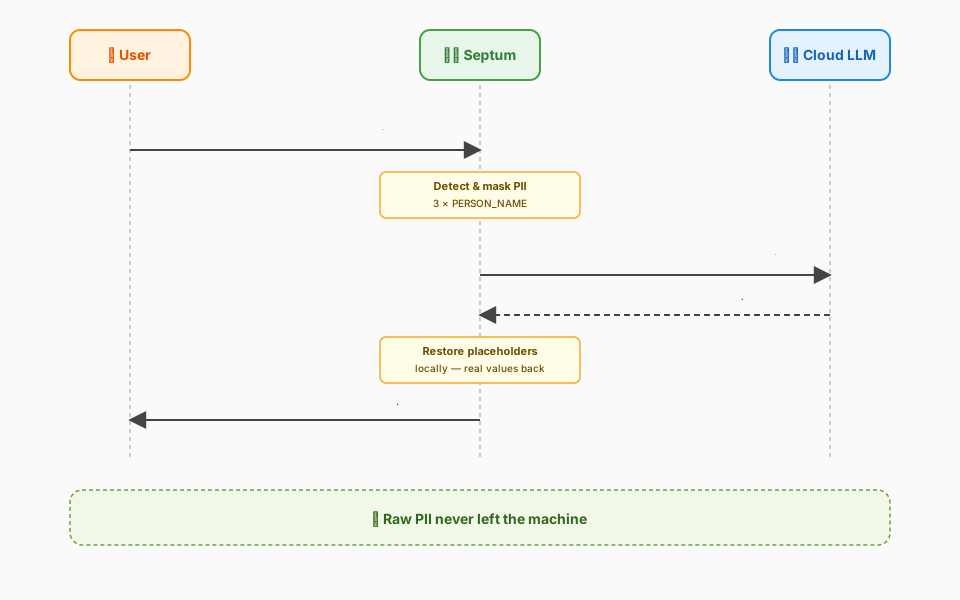
- Upload your documents — PDFs, Office files, images, audio. Septum detects file type, language, and personal data; masks all PII; prepares anonymised content for search. (📊 Pipeline diagram)
- Ask questions in chat — select specific documents, or leave the selection empty and let Septum decide. With no selection, a local Ollama classifier routes the question to either Auto-RAG (search all indexed documents) or a plain chatbot reply.
- Your question is masked too — the same three-layer pipeline runs on the message you typed, not just the documents. Names, phones, emails, IDs in your prompt all turn into placeholders before retrieval.
- Approve before sending — see the masked question, the retrieved chunks, and the assembled cloud prompt side by side. Approve or reject.
- Answer with real values — placeholders are restored locally so you see a natural, human-readable answer.
Architecture
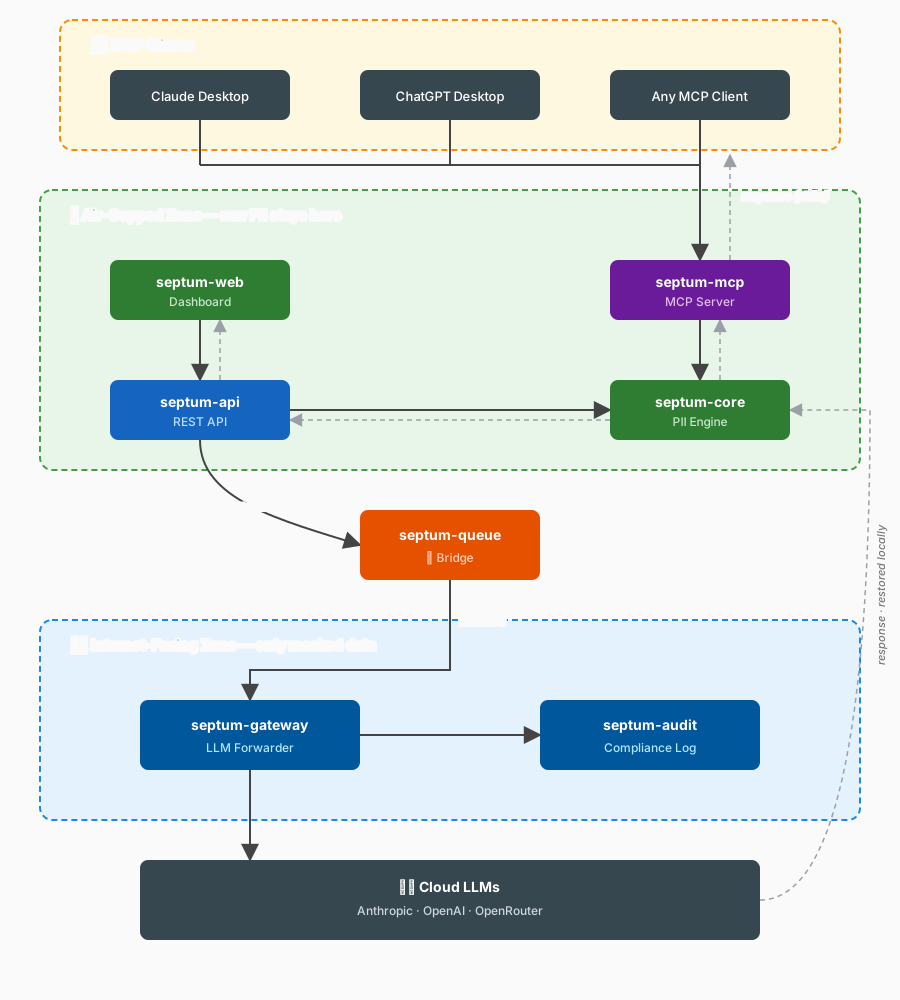
Septum is composed of 7 independent modules split across three security zones. Air-gapped modules handle raw PII with zero internet access. The bridge transports only masked placeholders. Internet-facing modules never see raw PII.
| Package | Zone | Purpose |
|---|---|---|
septum-core | Air-gapped | PII detection, masking, unmasking, regulation engine |
septum-mcp | Air-gapped | MCP server for Claude Desktop, ChatGPT, Cursor |
septum-api | Air-gapped | FastAPI REST layer + models, services, auth |
septum-web | Air-gapped | Next.js 16 dashboard |
septum-queue | Gateway | Cross-zone broker (file / Redis Streams) |
septum-gateway | Internet-facing | Cloud LLM forwarder — never imports septum-core |
septum-audit | Internet-facing | Compliance log + SIEM export — never imports septum-core |
Module contracts and zone semantics live in the Architecture doc.
Key Features
- Local PII Protection — three-layer detection (Presidio + NER + optional Ollama) on both uploaded documents and typed chat messages. Documents stored encrypted (AES-256-GCM).
- Approval Gate — review the masked prompt, retrieved chunks, and assembled cloud request before any LLM call. Nothing is sent without your review.
- 17 Regulation Packs — GDPR, KVKK, CCPA, HIPAA, LGPD, PIPEDA, PDPA, APPI, PIPL, POPIA, DPDP, UK GDPR, and more. Multiple active simultaneously; most restrictive wins. Region-specific national ID validators (TCKN checksum, Aadhaar Verhoeff, NRIC/FIN, CPF, NINO, CNPJ, My Number, and more).
- Auto-RAG Routing — when no documents are selected, a local Ollama classifier routes between Auto-RAG (search all indexed documents) and a plain chatbot reply. Auto-RAG is entity-aware: it scopes retrieval to the documents that actually contain the queried PII, with a disambiguation picker for ambiguous matches.
- Custom Rules — define your own detectors: regex, keyword lists, or LLM-prompt based.
- Rich Format Support — PDFs, Office files, spreadsheets, images (OCR), audio (Whisper), emails.
- Hybrid Retrieval — BM25 keyword matching + FAISS semantic search with Reciprocal Rank Fusion.
- Multi-Provider — Anthropic, OpenAI, OpenRouter, or local Ollama. Switch from the UI.
- JWT Auth + RBAC + API Keys — first user auto-promoted via setup wizard; admin UI manages roles (admin / editor / viewer). Programmatic API keys with SHA-256 hashed storage and per-prefix rate limits.
- MCP Server — standalone
septum-mcpexposes the same local masking pipeline to any MCP-aware client over stdio (Claude Desktop, Cursor, Windsurf) or streamable-http / sse (remote, browser, containerised clients) with bearer-token auth. - Document Relationship Graph — visual cytoscape-based map of which documents share entities (people, IBANs, IDs, organisations). Distinct-entity counts inside each node, edge weight scaled by entity uniqueness so a shared NATIONAL_ID outweighs a shared city name.
- Source Citation — every grounded chat answer shows which documents fed it and how many excerpts each contributed; expandable per-document breakdown sits under each answer.
- Audit Trail — append-only compliance log with entity detection metrics. No raw PII in audit events.
See the Features doc for the full detection benchmark, regulation pack table, MCP integration walkthrough, REST API + authentication reference, and the "why Septum" comparison. For every Septum screen — setup wizard, approval gate, document preview, settings tabs, custom regulation rules, audit trail — see the Screenshots tour.
Quick Start
The recommended installation brings up PostgreSQL, Redis, Ollama, and Septum together with one command:
git clone https://github.com/byerlikaya/Septum.git && cd Septum
cp .env.example .env
# Open .env in your editor and set POSTGRES_PASSWORD + REDIS_PASSWORD
docker compose up
Open http://localhost:3000 — the setup wizard walks you through database, cache, LLM provider, regulations, and the first admin account.
Looking for a simpler single-container demo, an air-gapped two-host split, a cloud-provider-only setup without Ollama, or the native source install for contributors? The Installation Guide covers all five supported topologies, system requirements, first-launch walkthrough, upgrades, and troubleshooting.
Support the Project
Septum is open source (MIT) and maintained in the open. If it saves you from a privacy incident, helps your team ship faster, or just makes your LLM workflow safer:
- ⭐ Star the repo on GitHub — the biggest signal that this project is worth continued investment.
- Open an issue for bugs or features you need — every report shapes the roadmap.
- Tell your team — privacy-first AI tooling is still rare, and word of mouth matters more than any ad.
License
See LICENSE for details.